
Public Sector Cloud Migration: How to Leave an Expiring Data Centre Without Moving Its Problems
Public sector cloud migration usually starts with a hosting contract ending. Here is how an IT Director audits the estate, chooses a path per workload, meets Cloud First and NCSC guidance, and cuts over with rollback ready.
The data centre contract is ending, and the servers behind your main public services are already out of support. A public sector cloud migration is now unavoidable. The safest route is to audit the estate, decide a migration path per workload, build the platform as code before data moves, and cut over with rollback ready.
Key takeaways
- Most public sector cloud migrations copy systems as they are, which carries old problems into the cloud along with new ones.
- Decide per workload: lift-and-shift only where a contract end date forces it, refactor where the service will run for years.
- Build the cloud platform, pipelines and monitoring before any data moves, so cutover is a switch, not a build.
- The Cloud First policy expects you to evidence any hosting choice other than public cloud, and to automate as much infrastructure as possible.
- Infrastructure as code answers the fear of losing control: the platform lives in files your team owns.
Why does public sector cloud migration stall on legacy servers?
Public sector cloud migration stalls because public bodies lack the in-house capacity to move and modernise at once, so systems are copied rather than improved.
The Department for Science, Innovation and Technology (DSIT) published its State of digital government review in January 2025. It found that around 55% of central government organisations have more than 60% of their estate in the cloud. Most of those migrations replicate systems “with minimal reengineering”.
The root cause is capacity, not skill. DSIT reports that a lack of internal teams and capacity holds back cloud adoption in local government. There, digital and data roles are only 2% of headcount, against benchmarks of 4%. The same few engineers run business-as-usual and are also asked to plan the exit.
A public sector cloud migration is the move of applications, websites and their data from servers a public body owns or leases to a public cloud platform. The definition matters because the move itself is the easy part. Whether the service improves depends on what changes along the way.
What does a rushed cloud move put at risk for a public body?
A rushed cloud move puts service availability, security assurance and the public body’s audit position at risk, because old weaknesses arrive in an environment with new ones.
The consequence already shows up as outages. The DSIT review reports that 25% of survey respondents suffered critical outages in 2024, with 123 in NHS England alone. A system that was fragile on-premises stays fragile when it is copied unchanged.
The National Cyber Security Centre (NCSC) puts it plainly in its lift-and-shift guidance: “Without additional work, your cloud system can end up with all the problems of the local system, together with some cloud-specific ones.”
The risks stack up in three places:
- Service risk. Manual releases and no reliable rollback mean every change to a live public service is a gamble.
- Security risk. Unsupported servers stop receiving patches, and a copied system keeps its old network assumptions.
- Assurance risk. Without records of each hosting decision, the body cannot show auditors why it chose what it chose.
How do you plan a public sector cloud migration that holds?
You plan a public sector cloud migration that holds by understanding the estate first, then building the platform before any content or data moves. Thornacre runs the audit like a discovery phase in the GDS Service Manual: understand the problem before committing to a build.
The diagram shows the six phases, with the fork where each workload takes its own path.
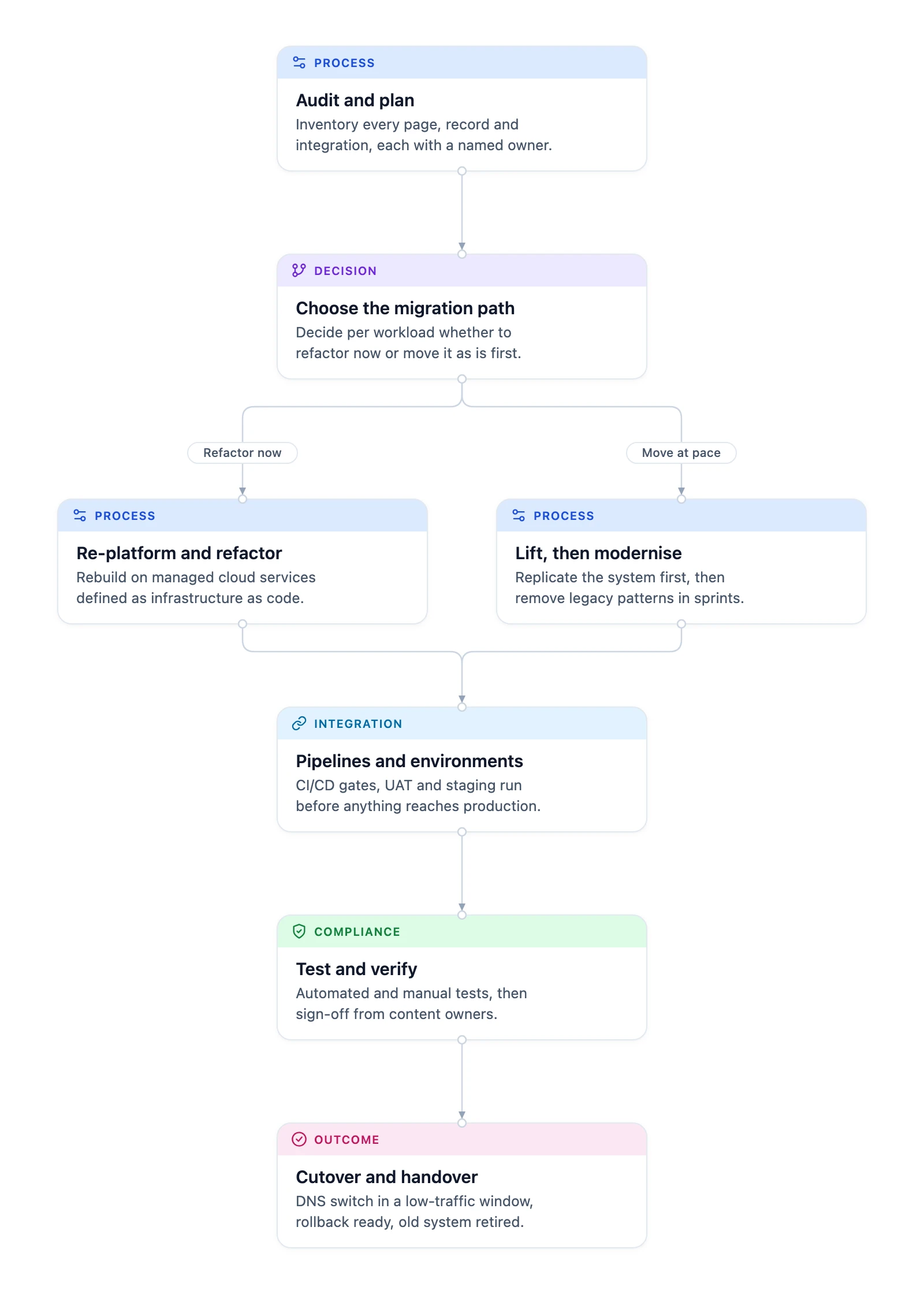
- Audit and plan. Crawl the current site or system. List every page, file, database record and link to other systems, with its owner and status: migrate, archive or delete. Outcome: a decision matrix the service owners approve.
- Choose the migration path. Decide per workload whether to refactor now or move it as it is and modernise afterwards. Outcome: a target architecture for each workload.
- Build the platform. Set up UK-hosted Microsoft Azure services with scaling, encryption and monitoring, all written as code. Outcome: a secure platform, ready before data arrives.
- Set up pipelines and environments. Create separate build, test, user acceptance, staging and live environments, with automated gates between them. Outcome: every change takes the same tested route to live.
- Migrate, test and verify. Move content and data, set up 301 redirects, then run automated and manual tests. Compare crawls and sitemaps of the old and new sites before content owners sign off. Outcome: checked content and working links.
- Cut over and hand over. Switch DNS in a low-traffic window, with full rollback available. Then back up, archive and shut down the old system. Outcome: a live service and full migration records.
Two details separate a clean move from a messy one. First, the audit names an owner for every item; anything without an owner is not migrated until someone claims it. Second, the platform is finished and tested before the first record moves. Cutover then becomes a DNS change you can reverse, not a weekend of building under pressure.
Infrastructure as code is the practice of defining servers, networks and services in files under version control, so any environment can be rebuilt the same way and every change is reviewed like code. Thornacre writes the whole platform this way, so the public body owns a copy it can rebuild.
How do you choose between lift-and-shift and refactoring?
Choose refactoring where the service will live for years and time allows; choose lift-and-shift only when a contract end date forces it. Re-platforming sits between the two.
| Criterion | Lift-and-shift | Re-platform | Refactor |
|---|---|---|---|
| Effort before the move | Lowest | Moderate | Highest |
| Security burden on you | Highest | Shared | Lowest |
| Ongoing maintenance effort | Often higher | Lower | Lowest over time |
| Best for | Expiring contracts, black-box apps | Standard CMS and web apps | Core public services with long lives |
Apply these rules per workload, not to the whole estate:
- If the contract end date forces the move, lift first, then modernise in planned releases.
- If the application is a standard CMS such as WordPress or Drupal, re-platform onto managed services.
- If the service will run for many years, refactor now, while the team already understands it.
Expect tension inside the organisation. Operations wants the exit date met; the security lead wants the NCSC principles met; finance wants the old contract closed on time. A decision recorded per workload lets each group see its priority honoured somewhere, rather than one argument about the whole estate.
How do Cloud First and NCSC guidance shape the platform?
Cloud First and NCSC guidance shape the platform by setting a public cloud default, a documented reason for any exception and a security control for each cloud principle.
The Cloud First policy says organisations “should default to Public Cloud first, using other solutions only where this is not possible”, and should evidence any other choice. It is equally clear on automation: “Organisations should strive to automate the provisioning and management of as much of their infrastructure as possible, reducing manual processes and deploying technologies which can continually patch and improve.” That sentence is the case for pairing the move with DevOps.
| Standard | What it requires | How the migration addresses it |
|---|---|---|
| Cloud First policy | Public cloud first; evidence the case for anything else | The workload assessment records each hosting decision |
| Technology Code of Practice | Criteria for designing and buying government technology | Architecture and supplier choices are documented against it |
| NCSC Cloud Security Principles | 14 principles, from data in transit to secure administration | The platform build maps controls to each principle |
| Cyber Essentials | Five technical controls against common attacks | Firewalls, patching and access control built into the code |
| UK GDPR Article 32 | Security appropriate to the risk | Encryption at rest and in transit, and UK data location |
DevOps then keeps the platform compliant after go-live. Continuous integration and continuous deployment (CI/CD) means every code change triggers automated tests and security scanning, and failing code does not deploy. Small, frequent releases follow the GDS guidance on deploying software regularly. Service health and security events are logged and alerted on, as the NCSC logging and monitoring guidance describes.
To track delivery after the move, use the four DORA software delivery metrics: deployment frequency, change fail rate, failed deployment recovery time and how quickly a committed change reaches live.
When is cloud migration not the right choice for a public body?
Cloud migration is not the right choice when the real problem is the data or the application, not the hosting. Moving a broken system to the cloud moves the problem with it.
- If records are moving off a legacy platform into a new data model, start with a data migration instead.
- If the application is end-of-life, rebuild it through custom software development.
- If contracts or data-sharing agreements require data to stay on servers you control, a public cloud move may breach those terms. Check them before you plan the move, and record the reason under Cloud First.
The usual objection is “we will lose control of our own platform.” Infrastructure as code answers it. The platform lives in files your team owns, every change is reviewed, and full records are handed over at the end.
Waiting adds risk too. Every week on unsupported servers adds exposure, and the time left before the contract ends keeps shrinking the options down to lift-and-shift.
What should an IT Director do first?
An IT Director should first list every site, application and system link on the servers being vacated, with its owner and contract end date. That single list exposes the workloads nobody owns, the integrations nobody documented and the contract that forces the earliest date.
Then sort the list into three groups: workloads to refactor, to re-platform and to lift first. Share it with your security lead and service owners before any supplier conversation. It turns the migration from one large decision into many small ones, each with an owner.
Frequently Asked Questions
Can some systems stay on-premises during a public sector cloud migration?
Yes, a public sector cloud migration can run in stages, with some systems staying on-premises while others move. The audit records every link between systems, so the plan keeps those links working across both environments. Each hosting decision is documented against the Cloud First policy, which asks you to evidence the case for anything other than public cloud.
Does moving to Azure change our UK GDPR obligations?
Moving to Microsoft Azure does not remove your UK GDPR obligations: the public body stays the controller and Microsoft becomes a processor. Article 32 still requires security appropriate to the risk. Keep data in the UK, encrypt it at rest and in transit, and record how each control meets the NCSC Cloud Security Principles, including asset protection and resilience.
How do you avoid downtime during cutover?
Cutover avoids unplanned downtime when the new platform is built and tested before any traffic moves. DNS changes happen in a low-traffic window, and propagation is monitored until it completes. Full rollback stays available at every stage, so a failed check returns the service to the old environment rather than leaving the public without it.
Will a cloud migration hurt our search rankings?
A cloud migration should not hurt search rankings if every old URL redirects to its new location. Set up 301 redirects for every migrated page, then crawl the new site for broken links. Compare page speed and rankings with the old site, so residents and service users still find the pages they bookmarked.
Is lift-and-shift ever the right answer?
Lift-and-shift is the right answer when a hosting contract end date leaves no room to refactor. Treat it as the first step, not the finish. The NCSC warns that a lifted system keeps its local problems and gains cloud-specific ones, so plan the modernisation releases before the move, not after.
How do we start a public sector cloud migration?
Start by listing every site, application and system link on the servers you need to leave, with its owner and contract end date. Then run a discovery-style audit with your security lead and service owners. Thornacre’s cloud migration and DevOps service runs that audit with your team; security work is covered on cyber security.
If your hosting contract or data centre lease is ending, ask us for a cloud migration assessment. We will map what you run, what depends on it and the safest path for each workload. Email hello@thornacre.com to arrange it.
This article is general guidance only; consult your legal or compliance team for your specific requirements.