
Public Sector Accessibility Audit: How to Evidence Your Accessibility Statement
When monitoring, a complaint or a go-live asks for proof, a public sector accessibility audit turns your accessibility statement from a document nobody can defend into one where every line traces to a WCAG 2.2 AA test result.
The monitoring team asks to see the evidence behind your accessibility statement, and the statement predates your last two redesigns. A public sector accessibility audit is how you answer: it tests your websites, apps and documents against WCAG 2.2 AA, fixes what fails and re-tests, so every line of the statement rests on a result.
Key takeaways
- A public sector accessibility audit tests against WCAG 2.2 AA, the standard named in government guidance, which added 9 success criteria in 2023.
- Automated scanners are not evidence: on a GDS test page the best single tool found 41% of the barriers.
- The accessibility statement drifts because nobody owns it end to end, not because anyone is negligent.
- Documented gaps are manageable; regulation 7 lets a public body claim disproportionate burden after an assessment.
- Start by listing your five busiest journeys and the date your statement was last reviewed.
Why do accessibility statements drift out of date in the public sector?
Accessibility statements drift because accessibility in a public body is split across three owners and nobody holds the whole service. The statement was accurate on the day it was written, and every change since has moved the service away from it.
The split usually looks like this:
- communications publishes content and PDFs every week
- IT owns the platform and its configuration
- a supplier owns the templates and components
Each owner fixes what they see. Nobody checks the journey a resident actually takes, from the landing page through the form to the confirmation email. That is a structural gap, not a failure of the people in those teams.
The standard also moved. WCAG 2.2 became a World Wide Web Consortium (W3C) Recommendation on 5 October 2023 and added 9 success criteria, covering areas such as focus visibility, dragging movements and target size. A site that passed a WCAG 2.1 audit in 2022 was never tested against them. The Web Content Accessibility Guidelines (WCAG) are the international technical standard for accessible web content, published by the W3C.
The need is large and the failures are common. Government guidance states that at least 1 in 5 people in the UK have a long term illness, impairment or disability. The WebAIM Million 2026 report found detectable WCAG failures on 95.9% of the top one million home pages.
What does a weak accessibility statement risk for a public body?
A weak statement exposes a public body to public enforcement, complaint escalation and rework at the worst moment. The Public Sector Bodies Accessibility Regulations 2018 require accessible websites and apps and a published accessibility statement that is reviewed regularly.
The government guidance is direct about the consequence. If the monitoring body decides a statement is missing or incorrect, it will publish the name of the body and a copy of the decision. The Equality and Human Rights Commission (EHRC) enforces the accessibility requirement in England, Scotland and Wales.
The risk is also operational:
- Complaints: a resident who cannot complete a form can complain under the Equality Act 2010, section 20, which sets the duty to make reasonable adjustments.
- Service assessments: the GDS Service Standard point 5 asks teams to make sure everyone can use the service, and assessors ask for evidence.
- Go-live: failures found after launch mean reworking templates rather than adjusting a wireframe.
Waiting makes each of these worse. Every redesign, new component and uploaded document adds to the backlog the next audit has to clear.
How do you run a public sector accessibility audit that stands up to scrutiny?
Run the audit in testing layers, each catching what the last one misses, then fix and re-test every failure. The W3C’s WCAG Evaluation Methodology (WCAG-EM) sets out how to sample and report, and the GDS Service Manual describes testing with assistive technology. The diagram below shows the sequence, including the fork where either the supplier or your own team fixes the issues.
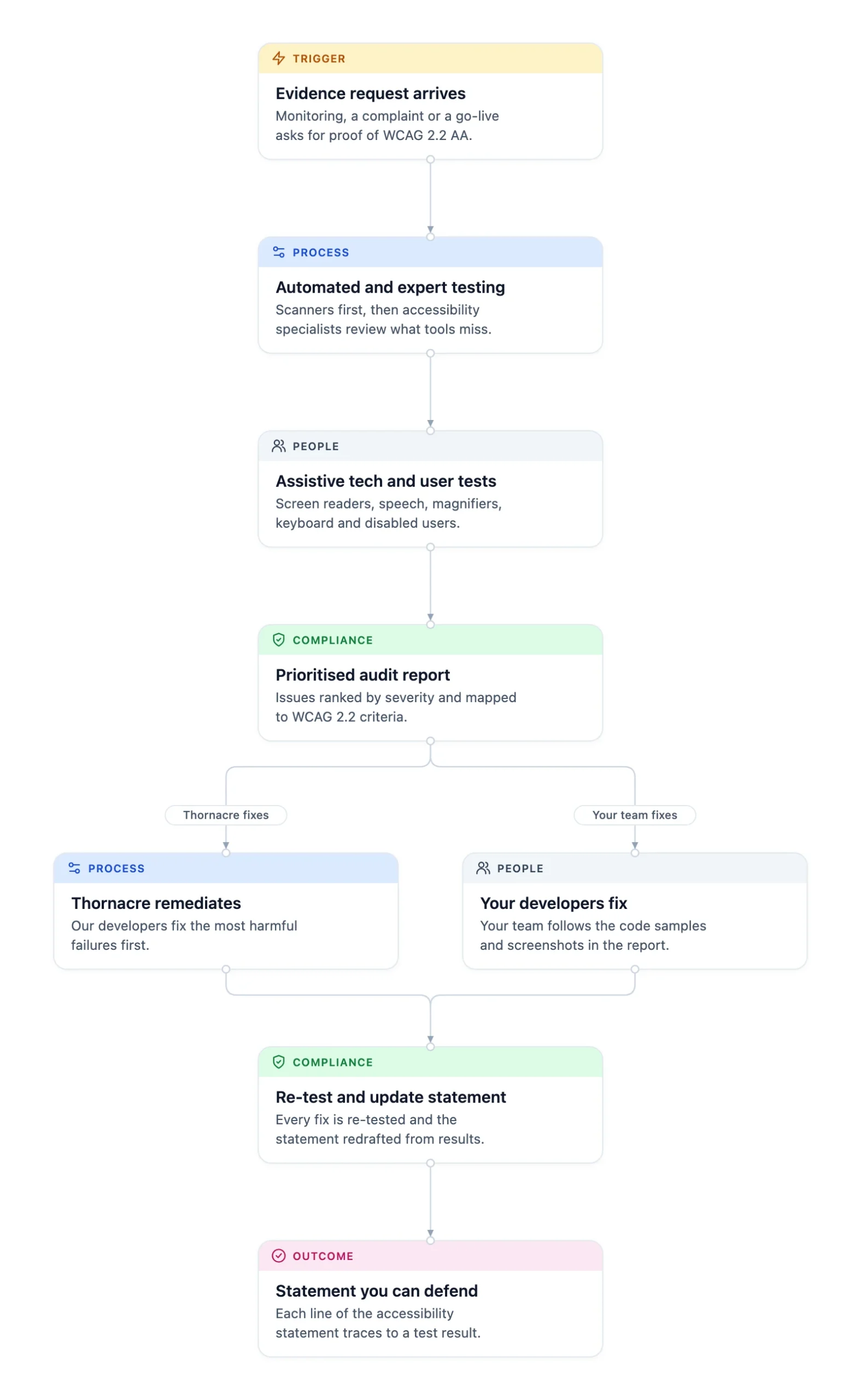
- Agree the scope. Confirm the websites, key journeys, apps and documents in scope. Following WCAG-EM, the sample covers every distinct page type and each complete process, such as an application from start to submission.
- Run automated and expert testing. Several scanners run first. Accessibility specialists then review what tools cannot judge: keyboard flow, reading order, focus and dynamic content.
- Test with assistive technology and disabled users. Use JAWS, NVDA and VoiceOver, speech recognition, magnifiers and keyboard-only navigation across browsers and devices. For complex journeys, disabled users complete realistic tasks.
- Report and prioritise. Rank every issue by severity and map it to its WCAG 2.2 criterion and the users it affects, so developers can start on the worst failures first.
- Fix the failures. Thornacre remediates, or your developers fix issues using the code samples and screenshots in the report.
- Re-test and update the statement. Re-test every fix and redraft the accessibility statement from the results.
- Monitor and train. Scan regularly for regressions after content or third-party changes, and train editors, designers and developers.
An accessibility statement is only defensible when each line traces to a test result, not to the date someone last looked at it.
Why is a clean scanner report not evidence?
A clean scanner report is not evidence because tools cannot judge most barriers. On a GDS test page with 143 deliberate failures, the best automated tool found 41%, and 29% were missed by every one of the 10 tools tested. Scanners are useful between audits, to catch regressions. They are not what you show a monitoring team.
Which public sector accessibility audit option fits your situation?
Choose an automated scan for regression monitoring and a full audit for any statement, go-live or complaint. If a resident has complained about one journey, test that journey with disabled users first, because that is the evidence a complaint review will ask for.
| Option | Finds | Good evidence for a statement? | Best when |
|---|---|---|---|
| Automated scan only | Code-level failures a tool can detect | No | Monitoring between audits |
| Expert audit (manual and assistive technology) | Keyboard, focus, reading order and screen reader failures | Yes | Annual statement review, procurement evidence |
| Full audit with user testing | Barriers in real tasks, such as forms and payments | Yes, strongest | High-volume transactional services, complaints |
| Accessibility-led rebuild | Prevents failures at design stage | Yes, once tested | Platform due to be replaced soon |
Use these rules to decide:
- If the statement was last reviewed before WCAG 2.2, commission an expert audit.
- If a complaint names a journey, add user testing for that journey.
- If the platform is being replaced, put the effort into the new build and run a light check of the live site.
When is a full public sector accessibility audit not the right choice?
A full audit is the wrong choice when the service is about to be replaced. Put the effort into accessible design and build of the new platform, with a light check of the live site to keep the statement honest in the meantime.
An audit also has limits where failures sit in a product you cannot change. The regulations exempt only third-party content that the body neither funded, developed nor controls. A component you bought and configured is usually still yours to fix.
The common objection is: “Our CMS vendor says the platform is accessible.” Platform accessibility is not the same as your service being accessible. The vendor’s claim covers its default templates, not your theme, configuration, forms or the PDFs your editors upload every week. The audit tests what residents actually meet.
The internal politics matter too. Communications may see accessibility as an IT problem, IT may see it as a content problem, and the supplier contract may not mention it. An audit report that names the owner of each failure gives all three a shared list to work from.
What should a head of digital do first?
List your five busiest user journeys and find the date your accessibility statement was last reviewed. That takes an afternoon, and it tells you whether the statement predates WCAG 2.2 and which journeys carry the most risk.
Then take one of those journeys and complete it with only a keyboard. If you lose track of focus or cannot submit the form, you have found a barrier that a scanner may not report, and the first line of your audit scope.
Frequently Asked Questions
What does a public sector accessibility audit cover?
A public sector accessibility audit covers the templates, key journeys, apps and documents agreed in the test sample. Following WCAG-EM, the sample includes every distinct page type and each complete process, such as an application form from start to submission. Logins, payments and third-party components you configured are tested as residents meet them, not in isolation.
Will an audit work with our CMS and existing supplier?
An audit works with any CMS or supplier, because it tests the live service. Each finding names the template, component or content item at fault, so it goes to the right owner: your editors, your developers or the supplier. Code samples are written so a supplier can apply them to their own templates.
Do PDFs and documents need to meet WCAG 2.2 AA?
Documents on a public sector website are in scope of the Public Sector Bodies Accessibility Regulations 2018. Government guidance exempts PDFs and other documents published before 23 September 2018 unless users need them to use a service, such as a form residents still complete. New documents must meet the standard, so audit PDFs, Office files and video alongside web pages.
What is the risk if we cannot fix every accessibility failure?
The risk is manageable if it is documented. Regulation 7 of the 2018 regulations lets a public body claim disproportionate burden after an assessment that weighs the burden on the organisation against the benefit to disabled users. Government guidance says lack of time or knowledge cannot count. The accessibility statement must then name the parts not met.
Is an intranet in scope of the accessibility regulations?
Public sector intranets and extranets must be accessible and publish an accessibility statement, according to government guidance. Content published before 23 September 2019 needs to be made accessible when it is next substantially revised. Staff-facing systems therefore belong in the audit sample when they carry processes staff must complete.
How do we start a public sector accessibility audit?
Start by listing your five busiest user journeys and the date your accessibility statement was last reviewed. Share both with Thornacre and we agree a test sample covering the journeys residents use most and any that have drawn complaints. See our accessibility services for the full method.
If your accessibility statement has not been checked against WCAG 2.2, send it with your five busiest journeys to hello@thornacre.com. We will run an assessment workshop with your digital and IT leads to show where the evidence gaps are. Thornacre also builds services accessibly from the start through custom software development and digital transformation; see our case studies for examples.
This post is general guidance only; consult your legal or compliance team for advice on your specific obligations.