
PCI DSS SAQ A for Charities, Colleges and Public Bodies: Keep Card Data Off Your Website
How charities, colleges and public bodies taking donations, course places and applications online can stay within PCI DSS SAQ A: hosted payment fields, controlled payment-page scripts and reconciliation that finance no longer does by hand.
The acquirer’s annual PCI DSS reminder arrives, and nobody can say whether the donation or course booking form puts you in SAQ A or SAQ D. For charities, colleges and public bodies, PCI DSS SAQ A comes from how the checkout is built: card data goes straight to the gateway and never touches your website.
Key takeaways
- PCI DSS SAQ A is the shortest self-assessment questionnaire, open to merchants whose website never handles card data.
- Hosted payment fields keep donors, students and applicants on your pages while card details go straight to the gateway.
- Since the January 2025 update, SAQ A merchants must confirm their site is not susceptible to script attacks that could affect the payment page.
- Your gateway’s PCI DSS status covers the gateway, not your donation page, its scripts or your CMS plugins.
- Connecting payments to the finance system and CRM ends rekeying and gives every transaction a matching record.
Why do charities, colleges and public bodies lose track of PCI DSS scope?
Charities, colleges and public bodies lose track of PCI DSS scope because payment pages grew piece by piece, and nobody owns the whole journey from card to ledger.
The pattern is familiar. An agency added a card form to the CMS years ago for donations or course places. Since then, analytics tags, chat widgets and marketing pixels have accumulated on the same pages. The finance system and the supporter CRM or student record system were never connected, so finance rekeys transactions from the gateway portal.
Ownership is split three ways. IT owns the website, finance owns reconciliation and compliance owns the questionnaire. Each team sees part of the risk, and the IT Director signs the annual questionnaire without knowing what runs on the payment page.
That is not the IT team’s fault. Small digital teams in these organisations inherited payment forms they did not design, and the PCI DSS rules for e-commerce changed under them.
What does unclear PCI DSS scope put at risk?
Unclear PCI DSS scope puts card data, finance capacity and the organisation’s reputation at risk. Donors, students and applicants trust you with payment details whether or not you know where those details go.
The threat is rising. UK Finance reported that remote purchase card fraud cases, where criminals use stolen card details to buy online, rose 13% to 3.2 million in 2025. The UK government’s Cyber Security Breaches Survey 2025 found that 30% of charities and 43% of businesses had a breach or attack in the past 12 months.
The impact lands in three places:
- IT and compliance: a questionnaire signed without evidence, and payment-page scripts nobody has authorised.
- Finance: staff hours spent rekeying donations, course payments and refunds into the ledger.
- Supporters and students: clunky redirects that lose donations and bookings at the last step.
Waiting makes each one worse. Every script added to a payment page widens the attack surface, and every reconciliation cycle done by hand takes finance time away from other work.
How do you stay within PCI DSS SAQ A?
You stay within PCI DSS SAQ A by making sure card data never reaches your website, and by controlling every script on the pages where customers pay. SAQ A is a design decision you make when you build the checkout, not a form you fill in at year end.
A Self-Assessment Questionnaire (SAQ) is the form a merchant uses to validate PCI DSS compliance; SAQ A is the shortest. The PCI Security Standards Council describes PCI DSS as “a set of baseline technical and operational requirements designed to protect payment account data”. Confirm your own eligibility against the criteria in the PCI SSC document library.
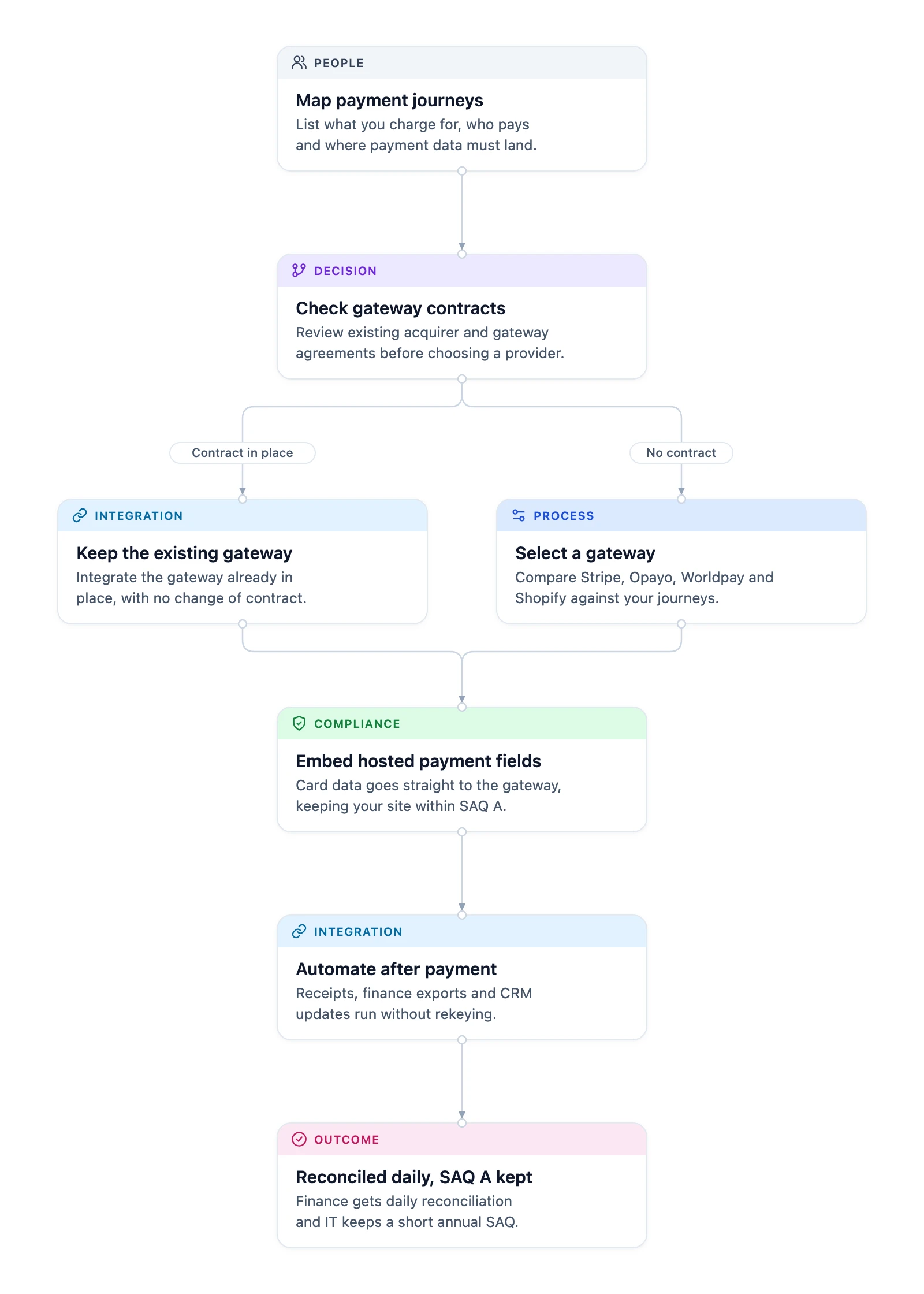
Thornacre works through six steps, delivered in the phases the GDS Service Manual describes:
- Map the payment journeys. List what you charge for, who pays and where payment data must land: donations, course places, event places, applications. Outcome: a scope everyone signs off.
- Check gateway contracts. If a contract is in place, keep the existing gateway and integrate it. If not, compare Stripe, Opayo, Worldpay and Shopify against your journeys. Outcome: no needless contract change.
- Embed hosted payment fields. Hosted payment fields are card inputs served by the gateway inside your booking or donation page. Card details go straight to the gateway, so your site stays within SAQ A. Strong customer authentication runs through 3D Secure 2.
- Automate after payment. Send receipts at once, deliver daily reconciliation reports to the finance system, and sync transactions to the supporter CRM or student record system.
- Protect and monitor. Keep an inventory of every script on payment pages, authorise each one and watch for unexpected changes, as PCI DSS requirements 6.4.3 and 11.6.1 describe. Protect the rest of the checkout with a Web Application Firewall (WAF) and audit logs, following the OWASP Top Ten.
- Hand over. Finance gets daily reconciliation, and IT keeps a short annual SAQ A with evidence.
The diagram shows the six steps and the fork at the gateway contract check.
What changed in SAQ A in January 2025?
In January 2025, the PCI Security Standards Council removed requirements 6.4.3 and 11.6.1 from SAQ A and added an eligibility criterion about script attacks. The revised SAQ A took effect on 31 March 2025.
Under the SAQ A update, merchants must “confirm their site is not susceptible to attacks from scripts that could affect the merchant’s e-commerce system(s)”. The Council was clear that the removed requirements “do not remove or diminish the underlying requirements within PCI DSS”.
In practice, the burden of proof moved to the merchant. A charity or college can no longer tick SAQ A simply because the gateway hosts the card fields. It needs evidence that the scripts on the donation or booking page are known, authorised and monitored. The script inventory in step 5 is that evidence.
Should you use hosted fields, a redirect or a direct API?
Use hosted payment fields when donors and students should stay on your site and PCI DSS scope should stay small. Use a redirect for the simplest build, and a direct API only if you accept a far larger scope.
| Criterion | Hosted payment fields | Redirect to gateway page | Direct API through your server |
|---|---|---|---|
| Who handles card data | Gateway | Gateway | Your servers |
| Donor or student experience | Stays on your pages | Leaves your site to pay | Stays on your pages |
| Typical questionnaire | SAQ A | SAQ A | SAQ D |
| Branding and journey control | Full | Limited | Full |
| Best fit | Bookings, courses, donations | Simple, low-volume payments | Rarely justified for these organisations |
Gateways such as Stripe are PCI DSS Level 1 service providers, and that status covers the gateway, not your website.
Apply these rules:
- If supporters abandon at the redirect, move to hosted fields.
- If a supplier proposes posting card data through your server, ask why.
- If you take Gift Aid declarations with donations, capture them in your own form beside the hosted fields, never inside them.
Strong customer authentication applies too. The Payment Services Regulations 2017, regulation 100 requires it, and the Financial Conduct Authority (FCA) confirms strong customer authentication has applied since 14 September 2019. 3D Secure 2 inside the hosted fields handles it, so your site never sees the authentication data. UK GDPR Article 32 still applies to the donor and student personal data around the payment.
When is a custom SAQ A checkout not the right choice?
A custom SAQ A checkout is the wrong choice when a gateway’s standard page meets your needs, or your payments are not online.
- Simple, occasional payments. A gateway’s hosted payment page is simpler to set up. You trade branding and back-office integration for speed.
- Phone and face-to-face payments. Card data taken by phone or terminal falls under different PCI DSS scope and controls; this approach is for online payments.
- Organisations that store card data. Storing card numbers yourself means full PCI DSS validation, often with a Qualified Security Assessor. Design to avoid that.
The usual objection is “our gateway is PCI compliant, so we are too.” The gateway’s PCI DSS status covers the gateway. Your donation page, its scripts and your CMS plugins are still yours, which is why SAQ A now asks about script attacks.
What should an IT Director do first?
An IT Director should list every page on which the organisation takes a card payment, and every script that loads on those pages, this week.
- List the payment pages: donations, course places, events, applications, shop.
- Open each page in a browser’s developer tools and record every script and its source.
- Ask who authorised each script, and remove the ones nobody can account for.
- Find your last PCI DSS questionnaire and check which SAQ type it claimed.
- Ask finance how many transactions they rekey in a typical cycle.
That list tells you whether SAQ A is realistic today, and what has to change to reach it. Thornacre’s PCI payment platform service builds from there, and our CRM and ERP integration work connects payments to the finance system. The wider website is covered by our cyber security service.
Frequently Asked Questions
Which payment journeys can a SAQ A checkout handle?
A SAQ A checkout handles the payments charities, colleges and public bodies take most often. That includes course places with deposits and instalments, donations with Gift Aid capture, event registrations, applications and merchandise. Each journey uses the same hosted fields, so adding one does not widen your PCI DSS scope.
Will hosted payment fields keep us in SAQ A?
Hosted payment fields are designed so card data goes straight to the gateway, which is what SAQ A eligibility requires. Since January 2025, you must also confirm your site is not susceptible to script attacks that could affect the payment page. Controlling and monitoring the scripts on payment pages lets you make that confirmation with evidence.
Can we keep our existing payment gateway?
Yes, an existing payment gateway can usually stay. Thornacre is gateway-agnostic and reviews your current acquirer and gateway contracts first. If the gateway supports hosted fields and the payment methods you need, integrating it beats moving to a new provider.
How does the checkout meet strong customer authentication?
The checkout meets strong customer authentication through 3D Secure 2, which runs inside the gateway’s hosted fields. The card issuer can ask the donor or student to approve the payment. The gateway and issuer decide when that challenge is needed, so your site never handles the authentication data.
How do payments reach our finance system and CRM?
Payments reach the finance system through daily reconciliation reports in a format it accepts, with CSV export for audit. Transaction data can also sync to the supporter CRM or student record system, updating payment status and triggering confirmations. Finance stops rekeying payments, and every transaction has a matching record.
How do we start?
Start with a payment journey assessment. Map what you charge for, the gateway contracts you hold and where payment data needs to go. You come away with the SAQ type your current set-up implies and the changes needed to reach SAQ A. Bring your last PCI DSS questionnaire.
If your PCI DSS questionnaire is due or finance still reconciles donations and course payments by hand, book a payment journey assessment with Thornacre. Email hello@thornacre.com to arrange it.
This article is general guidance only; consult your acquirer, Qualified Security Assessor or compliance team for your specific PCI DSS requirements.