
AI for Public Sector Casework: Clear the Backlog and Keep Staff in Control
How public bodies can use AI for casework to read, sort, extract and draft at volume, while staff approve every decision that affects a person and every action is logged for the DPO, the ICO and an ATRS record.
This week’s letters, forms and emails are still waiting, because each one is read, rekeyed and routed by hand. AI for public sector casework clears that backlog by automating the reading, sorting and drafting, while caseworkers keep every decision that affects a person and every action is logged.
Key takeaways
- AI for public sector casework works best on the steps between a request arriving and a caseworker acting on it: reading, classifying, extracting, routing and drafting.
- The unit of AI risk is the process step, not the project. Each step gets its own controls.
- Wherever an output affects a person, a caseworker approves it before it takes effect. That keeps decisions outside the UK GDPR rules for solely automated significant decisions.
- A pilot that runs beside staff, without acting on its output, gives the DPO an accuracy figure before anything goes live.
- Start with one high-volume process and map it end to end with the staff who run it.
Why does the casework backlog persist in the public sector?
The casework backlog persists because case management systems were bought to store records, not to read them. Every letter, form and email still needs a person to open it, decide what it is and rekey it.
That is not the operations team’s fault. A typical public body runs a case management system, a document store, a shared mailbox and a scanning service that were each bought for one job. None of them reads a letter and works out which team it belongs to. So skilled caseworkers spend the first part of every case on triage, not decisions.
The National Audit Office (NAO) found that the Central Digital and Data Office (CDDO) had identified almost a third of civil service tasks, those it defined as routine, as ones that could be automated. Reading and sorting casework post is exactly that kind of task.
The second root cause is how AI is bought. AI tools are sold as products, but the risk sits in how each output is used. A tool that summarises a case file is low risk; the same tool used to prioritise or refuse an application is not. Without a way to separate those uses, pilots stall at the Data Protection Officer’s (DPO’s) desk, and staff paste letters into public chatbots instead.
What does a casework backlog put at risk for a public body?
A casework backlog puts service quality, staff capacity and assurance at risk at the same time. Residents wait longer, caseworkers burn out on rekeying, and unmanaged AI use creeps in.
The NAO survey of 87 government bodies found that 37% had deployed AI and 70% were piloting or planning it. Only 30% had risk and quality assurance processes that explicitly covered AI risks. Of the 32 bodies with deployed AI, only 15 said use cases were always or usually identified at an organisational level before deployment.
That gap creates three exposures for an Operations Director:
- Service risk. Backlogs grow faster than recruitment can absorb. The NAO found difficulty recruiting or retaining AI skills was a barrier for 70% of respondents.
- Data protection risk. Staff using public AI tools with resident data creates uncontrolled data flows the DPO cannot see or assess.
- Assurance risk. An AI step that nobody mapped or logged cannot be explained to the Information Commissioner’s Office (ICO), to an internal auditor, or in an Algorithmic Transparency Recording Standard (ATRS) record.
The internal politics make it harder. The board wants the backlog cleared, the DPO wants evidence before anything touches real cases, and the staff side wants to know what happens to caseworkers’ jobs. A plan that answers all three is the one that gets approved.
How do you use AI for public sector casework safely?
You use AI for public sector casework safely by automating individual process steps, assessing each one for risk, and measuring accuracy before anything goes live. Delivery follows the agile approach in the GDS Service Manual, with controls from the AI Playbook for the UK Government.
AI for casework is the use of AI to automate steps in a casework process, whether that process is already digital or still runs on paper and email. Typical steps are:
- reading and classifying incoming documents and emails
- extracting data from forms and letters into the case management system
- triaging and routing cases, and checking submissions against eligibility rules
- drafting responses and summarising case files for caseworkers to approve
- agents that carry out multi-step back-office tasks across systems
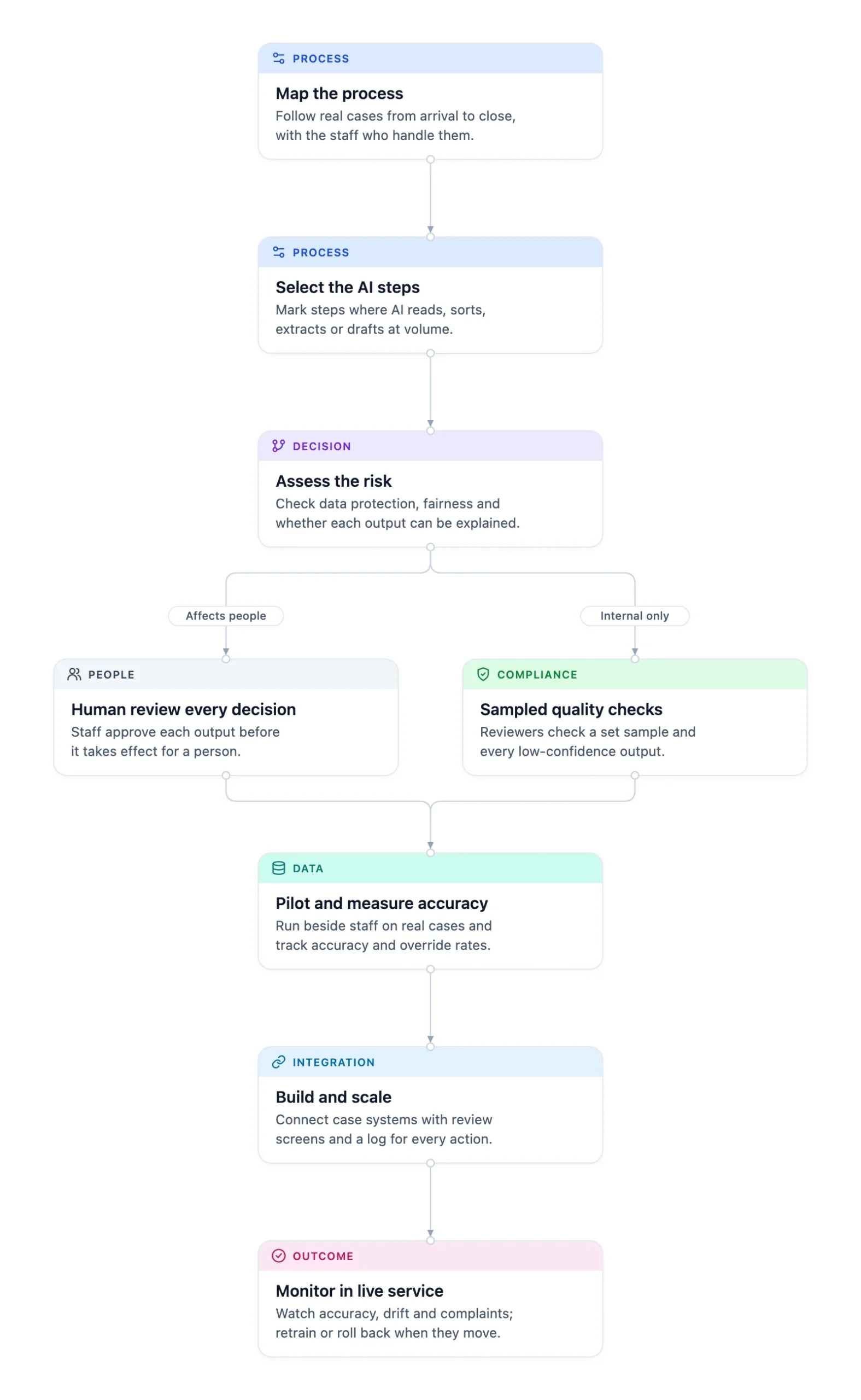
Thornacre works through seven phases, each ending with an outcome you can check:
- Map the process. Follow real cases from arrival to closure with the caseworkers who handle them. Outcome: a step map with volumes and handling times.
- Select the AI steps. Mark steps where AI reads, sorts, extracts or drafts at enough volume to justify the effort. Outcome: a ranked shortlist.
- Assess the risk of each step. Test data protection, fairness and explainability, and ask one question: does the output affect a person? Outcome: controls per step and input for your data protection impact assessment (DPIA).
- Pilot and measure accuracy. Run the AI beside caseworkers on real cases without acting on its output. Outcome: an accuracy figure per step, agreed before go-live.
- Build with review and logging. Connect to your case management system, with review screens showing the source behind each suggestion. Outcome: every action logged with input, output and approver.
- Scale. Extend to more teams or document types once pilot figures hold. Outcome: full volume.
- Monitor. Track accuracy, overrides, drift and complaints; retrain or roll back when they move. Outcome: a regular report your DPO and service owner both sign.
The diagram shows those phases, with the fork at the risk assessment between full human review and sampled checks.
How do you decide which casework steps need human review?
You decide by asking whether the output of the step affects a person. If it does, a caseworker approves every output. If it is internal only, reviewers check a sample and every low-confidence case.
| Step type | Example | Control |
|---|---|---|
| Affects a person | Routing, prioritising or refusing an application | Caseworker approves every output before it takes effect |
| Internal only | Classifying post, summarising a case file for a caseworker | Reviewers check a set sample and every low-confidence output |
| Unsuitable for AI | A decision a fixed rule table already covers | Rules-based workflow, no AI |
The original insight is this: one model can be safe for sorting post and unsafe for refusing an application, so controls belong to the step, not the model.
Override rate is the figure to watch once the step is live. A high rate means the AI step is not ready. A rate near zero needs checking too: reviewers may have stopped reading.
Which rules apply to AI in public sector casework?
AI in public sector casework must meet UK GDPR rules on automated decisions, ICO guidance on fairness and accuracy, the ATRS for central government and the Public Sector Equality Duty.
| Regulation or standard | What it requires | How the approach addresses it |
|---|---|---|
| UK GDPR Article 22C and ICO automated decision-making guidance | Safeguards for significant, solely automated decisions, including human intervention and the right to contest | Human review wherever a person is affected |
| ICO guidance on AI and data protection | Fairness, statistical accuracy, transparency and DPIAs | Per-step risk assessment and measured accuracy |
| ATRS | Mandatory for government departments and arm’s-length bodies delivering public services | Process maps and logs supply the record |
| Public Sector Equality Duty | Due regard to eliminating discrimination | Fairness tests in the pilot and in monitoring |
| AI Cyber Security Code of Practice | Baseline security principles for AI | Secure design to the Code’s principles |
| EU AI Act | High-risk uses include access to essential public services; these need human oversight and activity logging | Oversight and logging from the pilot |
The AI Playbook for the UK Government sets 10 principles. Principle 4 is the one casework depends on:
“You have meaningful human control at the right stages.” (GOV.UK)
The ICO guidance is also moving. The ICO states that, due to changes made by the Data (Use and Access) Act 2025, its AI guidance is under review. Controls designed in now take less rework than controls retrofitted after a change.
When is AI for casework not the right choice?
AI for casework is the wrong choice when volumes are low, rules are simple, or the decision should stay fully human.
- Low volume: a few hundred cases a year rarely justifies the effort of a pilot.
- Simple fixed rules: if a decision table covers every case, rules-based workflow is simpler to run and easier to explain.
- Fully automated decisions about people: Thornacre does not build AI that decides about a person without a caseworker.
- Paper and phone processes: if cases still arrive mainly by post and phone, digitise the front door first with digital transformation, then automate.
The approach takes effort up front: mapping and a pilot come before any caseworker time is freed. The DPO, service owner and staff side must also agree the controls, which is often harder than the engineering.
The usual objection is “AI is too risky for decisions about people.” So keep those decisions with people: AI reads, sorts and drafts, with measured accuracy and a log. Unmanaged use is the larger risk, and it is already happening wherever staff paste case details into public tools.
Choosing between an off-the-shelf product and a built automation is the other early decision:
| Criterion | Off-the-shelf AI product | Built automation |
|---|---|---|
| Speed to first result | Fast | Slower; mapping and a pilot come first |
| Human review design | Whatever the vendor offers | Review screens designed per step |
| Logs for the ICO or an ATRS record | Depends on the vendor | Every action logged in your systems |
| Lock-in | High | Low; you own the workflow and logs |
If one step in one system needs AI, such as summarising notes, a vendor tool with a DPIA may do. If the output routes, prioritises or refuses a person’s case, build human review into the workflow.
What should an Operations Director do first?
An Operations Director should pick one high-volume casework process with a visible backlog and map it end to end with the caseworkers who run it, this week.
- Choose the process with the largest backlog and the most rekeying.
- Sit with two caseworkers and follow ten real cases from arrival to closure.
- Mark each step as reading, sorting, extracting, drafting or deciding.
- Ask the DPO which of those steps affect a person, and record the answer.
- Share the map with the service owner and the staff side before choosing a tool.
That map is the input every later decision needs, whether you work with Thornacre or not. Thornacre’s AI transformation service takes it from there through the pilot, build and monitoring. If the source data needs cleaning first, see data analytics and AI.
Frequently Asked Questions
Will AI automation work with our existing case management system?
Yes, in most cases. The automation connects to the case management system through its API or, where it has none, through middleware, so caseworkers keep working in the screens they know. The AI writes suggestions into the case record and the reviewer approves them there. If the case system cannot be reached at all, see CRM and ERP integration.
Do we need a DPIA before an AI pilot on casework?
Usually, yes. The ICO lists AI as innovative technology that needs a data protection impact assessment (DPIA) when combined with another risk factor, such as decisions about access to a service. The per-step risk assessment gives your DPO the findings needed to complete it before the pilot touches real cases.
Will AI make decisions about the residents we serve?
No. Wherever the automation affects a person, a caseworker approves each output before it takes effect. AI reads, classifies and drafts; people decide. That keeps decisions outside the UK GDPR rules for solely automated significant decisions, and each approval is logged with the source the caseworker saw.
What happens if the AI gets a case wrong?
A wrong output is caught at review, logged and fed into accuracy monitoring. The review screen shows the source behind each suggestion, so rejecting it takes one action. If accuracy falls below the figure agreed in the pilot, the step returns to manual handling while it is retrained.
Do we need an ATRS record for casework AI?
The ATRS is mandatory for government departments and for arm’s-length bodies that deliver public or frontline services, and the Data Standards Authority recommends it for the broader public sector. The process map, per-step risk assessment and action logs give you the evidence to complete the ATRS template, rather than reconstructing it after go-live.
How do we start using AI for casework?
Start with one high-volume process with a visible backlog, and map it end to end. A workshop with the caseworkers who run it shows which steps suit AI, which need human review and what the DPO needs. You leave with a risk-ranked shortlist to act on.
If your casework backlog is growing and your DPO wants evidence first, book an AI process mapping workshop with Thornacre. Email hello@thornacre.com to arrange it.
This article is general guidance only; consult your legal or compliance teams for your specific requirements.