
CRM and ERP Integration That Gives Every Team One Trusted Record
CRM and ERP integration for regulated organisations whose customer data is split across the CRM, finance and line-of-business systems. Thornacre connects what you already own through secured APIs, so every team, report and audit works from one trusted record.
The regulator asks for everything you hold on one customer. The case notes sit in the CRM, the transactions sit in finance, and the history sits in a legacy line-of-business system. Thornacre’s CRM and ERP integration service designs, customises and connects those systems, so one record answers the question.
| At a glance | Detail |
|---|---|
| Who it is for | CTOs, IT Directors, Heads of Data, CISOs, DPOs and COOs in any regulated organisation with customer data across CRM, finance and legacy systems |
| The problem it solves | A customer record split across systems and years of customisation, so audit evidence cannot be joined |
| What we deliver | Estate mapping, schema design, platform customisation, APIs and middleware, migration and cleansing, training |
| How we work | Discovery as the GDS Service Manual describes, then APIs secured to NCSC guidance and OWASP ASVS |
| Regulations and standards | UK GDPR, NCSC API guidance, OWASP ASVS, Cyber Essentials, WCAG 2.2 AA |
What problem does CRM and ERP integration solve?
CRM and ERP integration solves the split customer record. Front-line teams, finance and operations each hold part of the truth, in platforms configured separately.
The trigger is a request nobody can answer quickly: an audit sample, a subject access request or a board question about one customer group. Each persona feels it differently:
- The CTO or IT Director maintains point-to-point links and custom code that break with every upgrade.
- The Head of Data gets three different customer counts from three systems.
- The CISO finds personal data copied into spreadsheets to bridge the gaps.
- The Compliance Lead or DPO cannot show that one record is complete and correct.
- The COO pays for the gap in staff hours, as teams rekey data and each copy drifts.
Exposure grows with each copy. The Cyber Security Breaches Survey 2025 found that 74% of large UK businesses identified a breach or attack in the previous 12 months, and only 45% reviewed the risks posed by their immediate suppliers.
None of this is the IT team’s fault. Estates grow through acquisitions and vendor choices years apart. Each platform, whether Salesforce, SAP, HubSpot or Sage, was bought for one job, then customised without a schema strategy and linked to the others under deadline.
How does Thornacre deliver CRM and ERP integration?
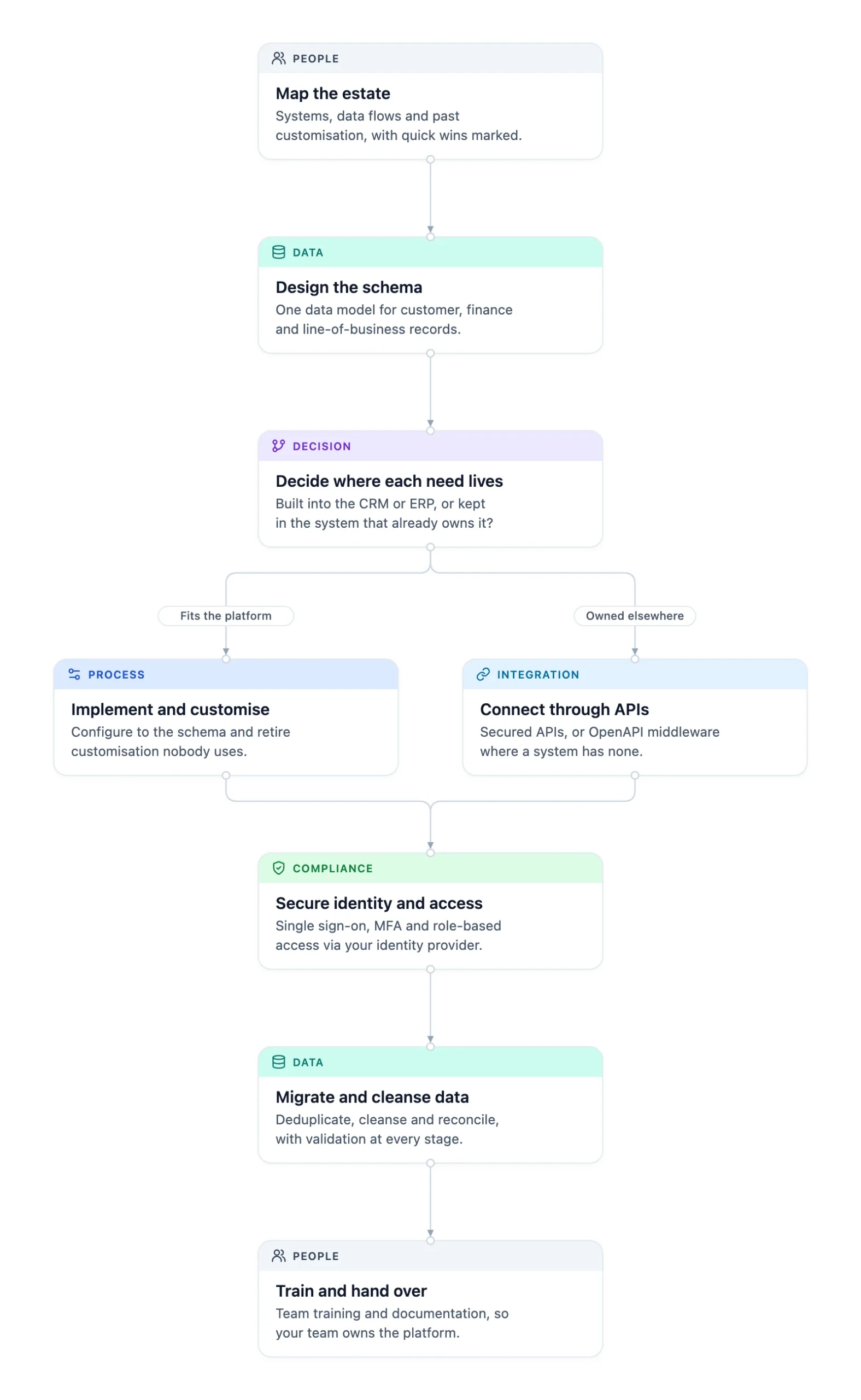
Thornacre delivers CRM and ERP integration in seven phases. Mapping follows the GDS discovery phase, and every interface is secured as the NCSC’s guidance on HTTP-based APIs and the OWASP Application Security Verification Standard set out.
- Map the estate. Review systems, data flows, past customisation and pain points with IT, compliance and front-line teams. Outcome: an estate map with quick wins marked.
- Design the schema. Model customers, cases and transactions as your business works them, and name the system that owns each entity. Outcome: one data model every platform is configured against.
- Decide where each need lives. Build each requirement into the CRM or ERP, or keep it in the system that already owns it. Outcome: no duplicated logic and no shadow databases.
- Implement, customise and connect. Configure the platform to the schema and retire customisation nobody uses. Connect other systems through their APIs, or REST middleware documented to OpenAPI 3.0 where they have none. Outcome: every system behind a documented, secured interface.
- Secure identity and access. Set up single sign-on, multi-factor authentication and role-based access through your existing identity provider. Outcome: each user sees only the data their role allows.
- Migrate and cleanse data. Deduplicate, cleanse and reconcile records, then migrate or sync them with validation at every stage. Outcome: one customer record that matches across systems.
- Train and hand over. Train your teams to run and extend the platform, with every customisation and interface documented. Outcome: your team owns the platform.
The diagram shows the seven phases, forking at phase 3 between customising the platform and connecting the system that owns the need.
A custom schema is the data model of entities, fields and relationships your CRM or ERP stores, designed around your processes rather than vendor defaults. Get the schema right first: integration copies a bad model faster.
What do you get from CRM and ERP integration with Thornacre?
Thornacre leaves you with a documented data model, working integrations and a team that can run them.
| Deliverable | What it gives you |
|---|---|
| Estate map | Every system, data flow and customisation, with an owner for each |
| Custom schema | One data model for customer, finance and case records, with field definitions |
| Configured CRM or ERP | Forms, workflows and extensions built to the schema |
| Customisation register | Each past customisation kept, restructured or retired, and why |
| APIs and middleware | Secured interfaces to finance and line-of-business systems, documented to OpenAPI 3.0 |
| Migration and validation rules | Cleansing, deduplication and reconciliation rules you can rerun |
Which regulations does CRM and ERP integration help you meet?
CRM and ERP integration helps you meet data protection, security and record-keeping rules, because one record is traceable across systems. Cross-sector standards come first:
- UK GDPR (ICO guidance): no shadow copies, encryption in transit and at rest, and role-based access support security, minimisation and accountability. Cleansing during migration supports accuracy.
- Cyber Essentials: integrations are designed to its technical controls against common attacks.
- WCAG 2.2: custom forms and screens are built to AA; see our accessibility service.
The National Cyber Security Centre (NCSC) explains why every interface needs that care:
“APIs enable communication between different software systems, often including third-party services, and can be used to access services and databases, manipulate data, or even handle user authentication and authorisation.” (NCSC)
Each sector adds its own rules, one example each:
| Sector | Regulation or framework | What it requires | How the service addresses it |
|---|---|---|---|
| Banking and payments | FCA SYSC 9 | Orderly records sufficient for the regulator to monitor compliance | Full audit logging on every integration |
| Investment and wealth management | FCA PRIN 2A (Consumer Duty) | Monitor customer outcomes, including for vulnerable customers | Vulnerability and outcome data joined across systems |
| Private healthcare | Data Security and Protection Toolkit | Assurance of good data security for organisations with access to NHS patient data | Role-based access and logged data flows as toolkit evidence |
| Legal and professional services | SRA Code of Conduct for Firms | Records that demonstrate compliance with SRA obligations | One matter and client record across practice and finance systems |
How do you choose between replacing and integrating your CRM?
Integrate when your core systems still work and the problem is the gaps between them. Restructure when the platform is sound but its customisation is not. Replace when the data model no longer fits and cannot be rebuilt.
| Criterion | Replace the CRM or ERP | Restructure the schema | Integration layer over existing systems |
|---|---|---|---|
| Route to first value | Migration comes first | Highest-friction customisations first | Quick wins from the estate map |
| Migration risk | High; every record moves | Medium; records reshaped in place | Low; data stays where it is |
| Audit evidence during change | Gap while systems run in parallel | Continuous, with change logs | Continuous |
| Fits when | The vendor is ending support | Users avoid the platform | Systems work but do not talk |
Use these rules for your own estate:
- If the system has an API, or can be given one, integrate.
- If the vendor is about to end support, plan a migration instead.
- If users avoid the CRM because its data model is wrong, fix the schema before you connect anything.
Most organisations do not have a CRM problem; they have a customer record problem that spans three systems. Fix the record and the CRM debate often goes away.
When is CRM and ERP integration not the right choice?
Integration is the wrong choice when a source system is about to retire, cannot export structured data or runs a process no platform fits.
- System at end of life: connecting it adds work you will throw away when it retires.
- No structured data: if a system cannot export data in any structured format, there is nothing to integrate.
- A process no platform fits: when the process is unique to you, a custom software build may serve better than bending a CRM.
The trade-off is dependency: your incumbent platform partner must cooperate on new endpoints and schema changes. That conversation between IT, procurement and the partner is often harder than the build.
The usual objection is “we have already invested heavily in this platform.” Past investment is no reason to keep a data model that does not work; most can be restructured rather than replaced. Waiting adds risk: every new customisation and point-to-point link adds debt and another copy of personal data to protect.
Frequently Asked Questions
Which CRM and ERP platforms do you work with?
Thornacre works with the major CRM and ERP platforms, such as Salesforce, Dynamics 365, HubSpot, SAP, NetSuite and Sage, and with bespoke and legacy systems. The method is the same on each: schema first, then configuration and integration.
What if our systems are old or have no APIs?
Old systems with no APIs can still be integrated through REST middleware documented to OpenAPI 3.0. Any structured export, such as CSV files, database views or scheduled reports, can be connected. Only a system with no structured export at all is out of reach, and then a migration is the better route.
How do you deal with years of past customisation?
Thornacre reviews every past customisation against the new schema and records whether to keep, restructure or retire it. Customisation that duplicates standard features or goes unused is removed; the rest is documented, so the next upgrade does not break it.
Can you work alongside our existing CRM partner?
Thornacre works alongside existing CRM and ERP partners and other suppliers to design new API endpoints, schemas and integration points. The estate map shows who owns each interface.
How do you keep customer data secure?
Integrations run through an API gateway, with encryption in transit and at rest and full audit logging. Thornacre designs controls to the NCSC Cloud Security Principles and UK GDPR. Read more about our cyber security service.
How do we start?
Start with a mapping workshop that traces one customer record across your CRM, finance and legacy systems. You leave with an estate map and the quick wins marked.
If your customer record is split across the CRM, finance and legacy systems, book a mapping workshop with Thornacre. Email hello@thornacre.com and we will map your systems against the evidence your auditors and regulators ask for.
This page is general guidance only; consult your legal or compliance teams for your specific requirements.