
Accessibility Audit and Remediation That Gets Your Digital Services to WCAG 2.2 AA
A WCAG 2.2 AA accessibility audit, remediation and re-test for websites, portals, apps and documents, so your organisation can show a complainant, a client or a regulator test evidence rather than a vendor's promise.
A customer complains they could not finish your online form with a screen reader, and nobody can show it was ever tested. Thornacre’s accessibility audit tests your websites, portals, apps and documents against the Web Content Accessibility Guidelines (WCAG) 2.2 AA, fixes what fails and re-tests it, for any regulated organisation that must prove its services work for disabled people.
| Service | Accessibility audit and remediation |
|---|---|
| Who it is for | CTOs and IT Directors, Heads of Data, CISOs, Compliance Leads and DPOs, and COOs in any regulated organisation |
| The problem it solves | Digital services nobody can prove are accessible when a complaint, a client questionnaire or a go-live asks for evidence |
| What we deliver | WCAG 2.2 AA audit, prioritised fix list, remediation and re-test, accessibility statement draft, training |
| How we work | The W3C’s WCAG Evaluation Methodology (WCAG-EM), with assistive technology testing as the GDS Service Manual describes |
| Regulations and standards | WCAG 2.2 AA, Equality Act 2010, European Accessibility Act, plus sector rules (see below) |
What problem does an accessibility audit solve?
An accessibility audit tells you which WCAG 2.2 AA requirements your digital services fail, why, and who owns each fix. That gives you evidence to show a complainant, a client’s procurement team or a regulator, instead of a vendor’s statement that the platform is accessible.
The trigger is usually a complaint, a client assurance questionnaire or a portal about to go live. Each asks: can you show the service works with a screen reader, a keyboard and a magnifier today?
UK government guidance states that at least 1 in 5 people in the UK have a long term illness, impairment or disability. The WebAIM Million 2026 report found detectable WCAG failures on 95.9% of the top one million home pages.
Each senior role meets a different part of the problem:
- CTO or IT Director: the platform, templates and supplier contracts, none of which name an accessibility standard.
- Head of Data: dashboards, charts and exported reports that a screen reader cannot read.
- CISO: login and verification steps, such as puzzles or retyped codes, that lock some disabled users out.
- Compliance Lead or DPO: no audit trail showing what was tested, when and against which criteria.
- COO: customers who fail online and phone instead, adding avoidable calls and complaints.
The root cause is rarely negligence. Accessibility is split between the content team, the platform team and a supplier, so nobody owns the whole journey. The standard also moved: WCAG 2.2 became a World Wide Web Consortium (W3C) Recommendation on 5 October 2023 and added 9 success criteria. A service that passed a WCAG 2.1 audit before then was never tested against them.
How does Thornacre deliver an accessibility audit and remediation?
Thornacre delivers an accessibility audit in testing layers, each catching what the last one misses, then fixes and re-tests the failures. The sampling and reporting follow the W3C’s WCAG Evaluation Methodology, and the assistive technology testing follows the GDS Service Manual. The diagram shows the sequence, including the fork for who fixes the issues.
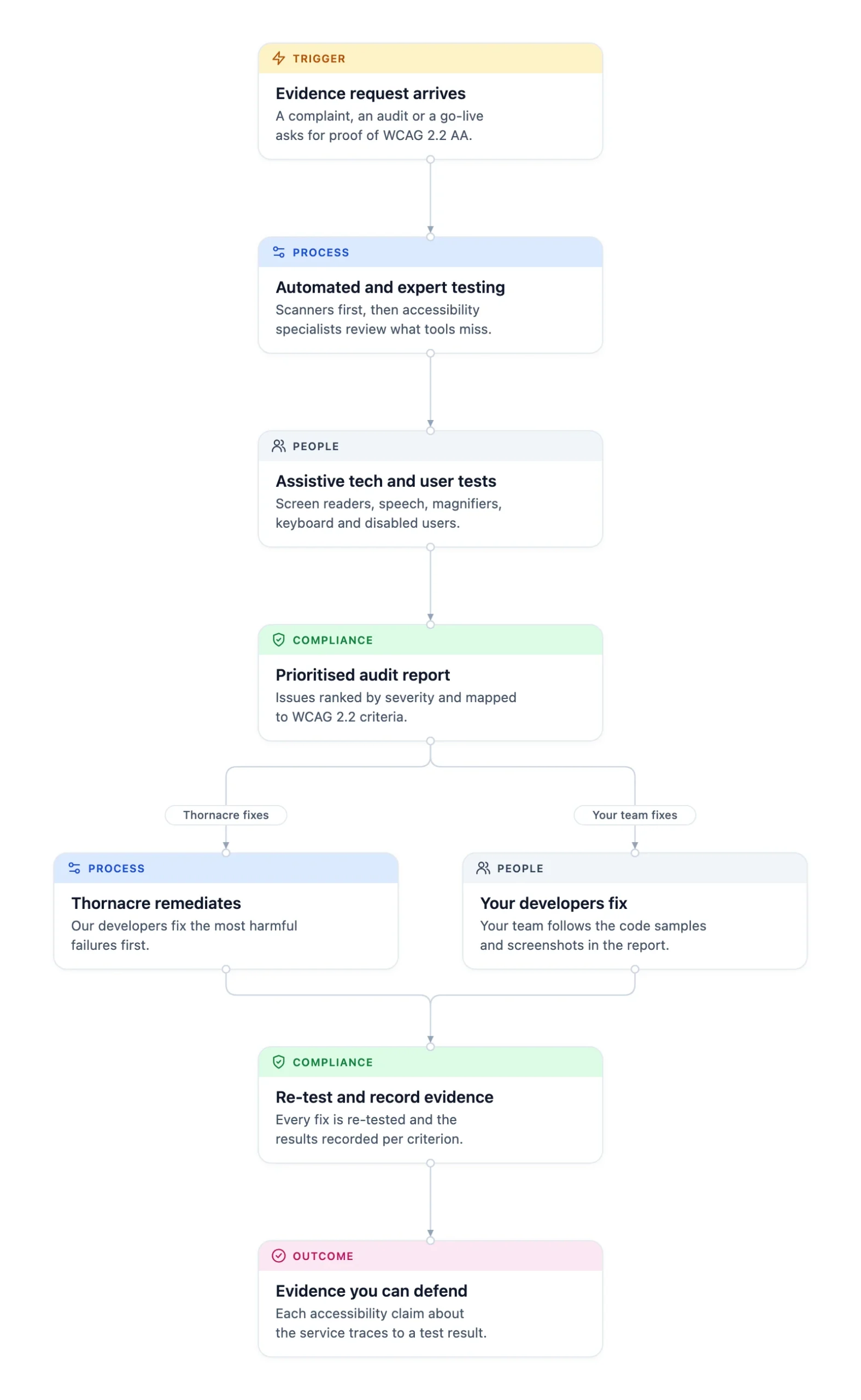
- Agree the scope. Confirm the websites, portals, key journeys, apps and documents in scope. Outcome: a signed-off test sample.
- Run automated and expert testing. Scanners run first, then specialists review what tools cannot judge: keyboard flow, reading order, focus and dynamic content. Outcome: a full list of technical failures.
- Test with assistive technology and real users. Use JAWS, NVDA, VoiceOver, speech recognition, magnifiers and keyboard-only navigation. For complex journeys, disabled users complete realistic tasks. Outcome: proof that compliance means usability.
- Report and prioritise. Rank every issue by severity and map it to its WCAG criterion and the users it affects. Outcome: a fix list developers can start on that day.
- Fix the failures. Thornacre remediates, or your team fixes issues using the code samples in the report. Outcome: the most harmful failures resolved first.
- Re-test and record the evidence. Re-test every fix and draft the updated accessibility statement. Outcome: each claim about the service traces to a test result.
- Monitor and train. Scan for regressions after content changes, and train editors, designers and developers. Outcome: your team keeps the standard.
On a Government Digital Service (GDS) test page with 143 deliberate barriers, the best automated tool found 41% and every tool combined missed 29%. A clean scanner report tells you what a tool can see, not whether a disabled customer can finish the journey.
The login step needs its own test. WCAG 2.2 criterion 3.3.8, Accessible Authentication (Minimum), is a Level AA requirement, which the W3C summarises as: “Don’t make people solve, recall, or transcribe something to log in.”
What do you get from a Thornacre accessibility audit?
You get findings your team can act on and records you can show an auditor: a written report and a spreadsheet with reproducible steps for every issue.
| Deliverable | What it gives you |
|---|---|
| Prioritised issue list | Issues ranked by severity, so you fix the most harmful first |
| WCAG references | Each problem mapped to the WCAG 2.2 criterion it fails |
| Corrective actions | Fixes your developers or supplier can follow, with code samples and screenshots |
| Accessibility impact map | How each issue affects different user groups |
| Authentication findings | Login and verification steps checked against criterion 3.3.8 |
| Accessibility statement draft | A statement of what conforms and what does not, based on the findings |
Thornacre audits websites, web applications, portals, PDFs, Office documents and video, and trains your staff so the standard holds.
Which regulations does an accessibility audit help you meet?
An accessibility audit gives every UK organisation evidence against WCAG 2.2 AA and the Equality Act 2010. WCAG 2.2 is the technical benchmark; the W3C describes WCAG as “a single shared standard for web content accessibility that meets the needs of individuals, organizations, and governments internationally.”
The cross-sector obligations are:
- Equality Act 2010, section 20: the duty to make reasonable adjustments for disabled people.
- Equality Act 2010, section 29: service providers must not discriminate against people using their services.
- European Accessibility Act (Directive (EU) 2019/882): accessibility requirements for listed products and services provided to consumers in the EU after 28 June 2025.
Each sector adds its own rule, and the same audit method produces the evidence for each.
| Sector | Regulation or framework | What it requires | How the audit addresses it |
|---|---|---|---|
| Banking and payments | European Accessibility Act | Accessible consumer banking services for EU customers | Online banking and payment journeys tested to WCAG 2.2 AA |
| Insurance | FCA Consumer Duty, PRIN 2A.6 | No unreasonable barriers to customer support, claims or changes | Claims and policy change journeys tested with assistive technology |
| Private healthcare | NHS Accessible Information Standard | Providers of NHS-funded care meet disabled people’s information needs | Booking, results and information pages audited for accessible formats |
| Public sector | Public Sector Bodies Accessibility Regulations 2018 | Accessible websites and apps, with a published accessibility statement | Audit against WCAG 2.2 AA and a statement drafted from results |
How do you choose between a scan and an accessibility audit?
Choose an automated scan for regression monitoring and a full accessibility audit for any complaint, go-live or assurance request. If a customer has complained about one journey, test that journey with disabled users first, because that is the evidence a complaint review will ask for.
| Option | Finds | Good evidence for an auditor? | Best when |
|---|---|---|---|
| Automated scan only | Code-level failures a tool can detect | No | Monitoring between audits |
| Expert audit (manual and assistive technology) | Keyboard, focus, reading order and screen reader failures | Yes | Annual review, client or procurement questionnaires |
| Full audit with user testing | Barriers in real tasks, such as logins, forms and payments | Yes, strongest | High-volume customer journeys, complaints |
| Accessibility-led rebuild | Prevents failures at design stage | Yes, once tested | Platform due to be replaced soon |
When is an accessibility audit not the right choice?
An accessibility audit is the wrong choice when the service is about to be replaced. Build the new platform accessibly instead, and lightly check the live service so known barriers are recorded.
An audit also has limits where failures sit in a product you cannot change: it names the supplier who owns the fix, but remediation depends on their roadmap.
The common objection is: “Our platform vendor says the product is accessible.” The vendor’s claim covers its default templates, not your theme, configuration, forms or the documents your teams upload. The audit tests what your users actually meet.
Internal politics often stall the work: content teams call it an IT problem, IT calls it a content problem. A report that names the owner of every failure gives each team its own list.
Waiting adds risk, because each redesign and uploaded document adds to the backlog.
Frequently Asked Questions
What does an accessibility audit cover?
An accessibility audit covers the templates, key journeys, apps and documents agreed in the test sample. Following WCAG-EM, the sample includes every distinct page type and each complete process, such as an application from start to submission. Logins, payments and third-party components you configured are tested as users meet them, not in isolation.
Will an audit work with our CMS, CRM portal and existing supplier?
An accessibility audit works with any CMS, CRM portal or supplier, because it tests the live service. Each finding names the template, component or content item at fault, so it goes to the right owner: your editors, your developers or the supplier. Code samples are written so a supplier can apply them to their own templates.
Do PDFs and documents need to meet WCAG 2.2 AA?
Documents that customers need to use a service should meet WCAG 2.2 AA, because a form or statement they cannot read is a barrier under the Equality Act 2010. Thornacre audits PDFs, Office documents and video alongside web pages, and recommends an accessible web page instead of a PDF wherever the content allows.
Will accessibility fixes weaken our security controls?
Accessibility fixes rarely weaken security when both teams design them together. WCAG 2.2 criterion 3.3.8 asks that logins avoid puzzles, memorised strings and retyped codes unless an alternative exists. Allowing password managers, paste and passkeys usually meets the criterion while keeping multi-factor authentication in place.
How do we start an accessibility audit?
Start by listing your five busiest customer journeys and finding the date they were last tested for accessibility. Share both with Thornacre and we agree a test sample covering the journeys customers use most and any that have drawn complaints.
Send your five busiest journeys and any recent accessibility complaints to hello@thornacre.com, and we will run an assessment workshop with your technology, compliance and operations leads to show where the evidence gaps are. See also custom software development, digital transformation, cyber security and our case studies.
This page is general guidance only; consult your legal or compliance team for advice on your specific obligations.