
Data Migration From Old System to New, With Every Record Reconciled and Signed Off
Data migration for regulated organisations replacing a CRM, case management system, line-of-business system or database: source analysis, field mapping, cleansing, trial loads and reconciliation, then a cutover you can roll back.
The new CRM contract is signed and the go-live date is set. Fifteen years of records still sit in the old system, in a structure nobody fully understands. Thornacre’s data migration service moves them to the new system for regulated organisations, with every record mapped, reconciled and signed off.
| Who it is for | Heads of Data, CTOs, IT Directors, CISOs, DPOs and COOs in any regulated organisation replacing a CRM, case management, line-of-business or content system, or merging several |
| The problem it solves | Records that load cleanly into the new system but mean the wrong thing, found after the old system is switched off |
| What we deliver | Source and target analysis, mapping specification, load routines, reconciliation reports, cutover runbook with rollback, decommissioning record |
| How we work | Seven phases, with every trial load reconciled and data quality judged against the UK GDPR accuracy principle as the ICO explains it |
| Regulations and standards | UK GDPR, ICO guidance on accuracy and DPIAs, plus sector record-keeping and data integrity rules |
What problem does data migration solve?
Data migration makes a new system usable, because a new system is only as good as the data loaded into it. The trigger is a decision already made: a replacement CRM, a merger, or a database moving to the cloud.
That trigger is now common. The Office for National Statistics (ONS) Management and Expectations Survey found 69% of UK firms with 10 or more employees used cloud-based systems and applications in 2023.
A poor data migration fails quietly. The load runs clean. Months later, a status that meant “closed” in the source but “on hold” in the target turns up in a subject access request or a complaint. By then the source is gone. The Information Commissioner’s Office (ICO) completed 36,049 data protection complaints in 2024; wrong data is one way an organisation joins that list.
Each persona owns part of the risk:
- The Head of Data must prove the target holds what the source held.
- The CTO or IT Director owns the cutover and the route back if it fails.
- The CISO has live personal data sitting in extracts, test copies and transfer files.
- The Data Protection Officer (DPO) or Compliance Lead must show the data stayed accurate and expired records were not carried forward.
- The COO needs staff working on the new system from day one, not keeping side spreadsheets.
The root cause is not the team. Source and target systems model the world differently, and the old schema’s rules often live only in staff memory.
How does Thornacre deliver a data migration from source to target?
Thornacre delivers a data migration in seven phases, each with a named owner and an outcome. The diagram shows the flow, including the loop when reconciliation finds breaks.
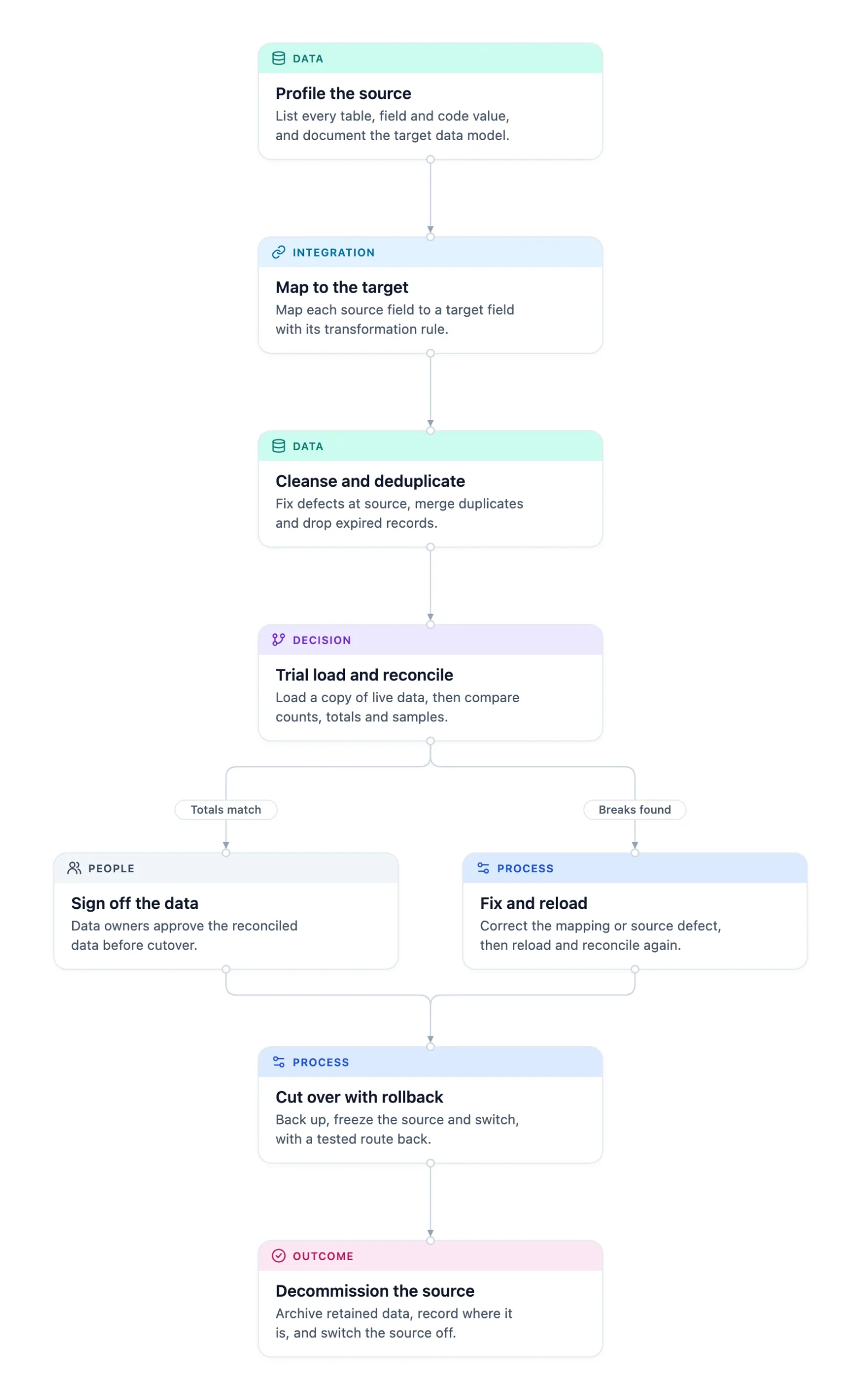
- Profile the source and the target. List every source table, field and code value, measure gaps and duplicates, and document the target’s model. Mark each dataset migrate, archive or delete. Outcome: a data inventory.
- Map fields and transformation rules. Map each source field to a target field with its conversion rule: code lookups, date formats, split names. Outcome: a mapping specification signed by the data owner.
- Cleanse and deduplicate. Fix defects at source, merge duplicates using agreed match rules, and leave expired records behind. Outcome: a log of every change.
- Run trial loads and reconcile. Load a copy of live data into a controlled test target and compare it with the source. Outcome: a reconciliation report for every run, with each break explained.
- Sign off, or fix and reload. If totals match, data owners sign off. If breaks are found, correct the mapping or source defect, then reload and reconcile again. Outcome: written sign-off.
- Cut over with a rollback plan. Take a full backup, freeze the source and run the rehearsed cutover with go and no-go points. Outcome: the target live, with a tested route back.
- Decommission the source. Once the target runs cleanly, archive what must be kept, record where, and switch the source off. Outcome: a decommissioning record.
Reconcile three ways, because a record count proves volume, not accuracy: counts per entity, control totals on numeric and date fields, and a random sample checked field by field by someone who uses the records.
What do you get from a Thornacre data migration?
You get the migrated data and the evidence that it moved correctly. Every artefact stays with you.
| Deliverable | What it gives you |
|---|---|
| Data inventory | Every source table, its owner, quality and fate |
| Mapping specification | Field-level rules, signed off by the data owner |
| Load routines | Version-controlled scripts reused for every trial and the live load |
| Reconciliation reports | Counts, control totals and sample results for each run |
| Cutover runbook | Ordered steps, go and no-go points, and the rollback plan |
| Decommissioning record | Backup confirmation, archive location and switch-off record |
Data migration is the controlled transfer of data from a source system to a target system, with every record checked. A data migration is finished when someone accountable signs a reconciliation proving the target holds what the source held, not when the load completes.
Which regulations does data migration help you meet?
A data migration helps you meet the UK GDPR accuracy and storage limitation principles, and the record-keeping and data integrity rules in your sector.
UK GDPR Article 5 requires personal data to be “accurate and, where necessary, kept up to date”, and kept no longer than necessary. The ICO guidance on the accuracy principle sets the bar: “You should take all reasonable steps to ensure the personal data you hold is not incorrect or misleading as to any matter of fact.” A signed reconciliation shows those steps were taken. The plan records early whether a data protection impact assessment is needed.
| Sector | Regulation or framework | What it requires | How the migration addresses it |
|---|---|---|---|
| Banking and payments | FCA Handbook SYSC 9 | Records of all services, activities and transactions, kept so the regulator can supervise | Retained records migrated or archived readable, with reconciliation proof |
| Legal and professional services | Money Laundering Regulations 2017, regulation 40 | Customer due diligence and transaction records kept for the period the regulation sets | Retention-driven migrate or archive decision per dataset |
| Private healthcare | Data Security and Protection Toolkit | Organisations with access to NHS patient data and systems must use the toolkit | Controlled handling of extracts and evidence mapped to toolkit standards |
| Life sciences and pharma | EU GMP Annex 11 | Validation checks that migrated data is not altered in value or meaning | Field-level reconciliation and signed migration reports |
| Public sector | Section 46 records management code | Records managed through their life, including disposal | Migrate, archive or delete decided and recorded per dataset |
How do you choose between big-bang and phased data migration?
Choose big-bang when one source feeds the target and a short outage is acceptable. Choose phased when the business cannot stop or several sources are consolidated. Choose a parallel run when an undetected error causes direct harm.
| Criterion | Big-bang | Phased | Parallel run |
|---|---|---|---|
| Outage | One cutover window | Short window per phase | Little or none |
| Best fit | One source, few interfaces | Many interfaces, or several sources merged in turn | High-harm processes where errors must be caught live |
| Main risk | One cutover must succeed | Data split across systems mid-way | Double running effort, and the two systems drifting apart |
Apply these rules to your own estate:
- If you are consolidating several systems, migrate one source at a time and deduplicate against the target.
- If the go-live date is close, migrate active records and archive closed ones in a readable format.
- If nobody will own a dataset, do not migrate it until someone does.
The programme board wants the go-live date, the vendor wants its import tool used, and the DPO wants an impact assessment. Agreed sign-off criteria turn that tension into a checklist.
When is a full data migration not the right choice?
A full data migration is the wrong choice when the source can stay as the system of record. It is also wrong when the data is kept only for retention.
A common objection is that the old system should simply be replaced and everything moved. In regulated settings that carries risk many cannot absorb; sometimes the source stays behind an integration layer, which our CRM and ERP integration team builds.
- If only the hosting changes, you need cloud migration and DevOps, not a data migration.
- If the process still runs on paper and spreadsheets, start with digital transformation.
- If there are only a few hundred records, rekeying by hand takes less effort than building load routines.
Waiting rarely helps. Every year the source runs, more patches accumulate and fewer people remember what the old codes mean.
Frequently Asked Questions
Should we migrate all our historical data?
Migrate the records the target needs to run the business, not everything the source holds. Mark each dataset migrate, archive or delete during profiling, guided by your retention schedule and the record-keeping rules in your sector. Archived data stays readable outside the new system, and expired records are not carried forward, which meets the UK GDPR storage limitation principle.
How does a data migration fit with our existing systems and integrations?
A data migration must account for every system that reads or writes the source data. Reports, interfaces and file feeds are listed during profiling, repointed or rebuilt for the target, and switched in a planned order at cutover.
What is the biggest risk in a data migration?
The biggest risk is data that loads without error but means something different in the target system. A reused status code or a badly split free-text field passes technical checks yet fails the business. Field-level sampling by people who use the records every day catches it before sign-off.
Can the new system’s vendor migrate the data for us?
The new system’s vendor can usually load data, but its import tool expects data that already fits the target. The tool rarely profiles the source, interprets old codes or reconciles the result. Use it for the load step, and keep mapping, cleansing and reconciliation under your control.
How is personal data protected during the migration?
Personal data stays protected when extracts, test copies and transfer files are treated as live data: access limited to named people, encryption in transit and at rest, and test copies deleted when trials end. Where the data is high risk, such as large volumes of health records, the DPO decides whether a data protection impact assessment (DPIA) is needed. UK GDPR Article 32 security duties apply to every copy, not only the source and target.
How do we start a data migration?
Start by listing every system and report that reads the source data, then name an owner for each dataset. Then profile the largest tables. Thornacre can run this discovery with you; past projects are on our case studies page.
Bought a new system with old data still to move? Ask us for a data migration workshop with your data, IT and governance leads. You leave with a scoped plan. Email hello@thornacre.com to arrange it.
This page is general guidance only; consult your legal or compliance team for your specific requirements.